

To facilitate the integration of Shelly modules, the ShellyLib library is available, which contains function blocks for communication between Tecomat PLCs (Foxtrot 2 and TC800 series) and selected Shelly modules via a local Wi-Fi network. The function blocks in the ShellyLib library support communication with the modules via Wi-Fi using the RPC protocol. This protocol is supported by Shelly OS, and detailed documentation is available on the manufacturer’s website. The protocol is symmetric: both parties can call methods and send notifications.
The library now supports the following components:
- Shelly Mini 1
- Shelly Mini 1PM
- Shelly Plug SG3
- Shelly Plus I4
- Shelly Plus 1
- Shelly Plus 1PM
Notes:
- Modules with “Plus” in their name (i.e., Shelly Plus I4, Shelly Plus 1, and Shelly Plus 1PM) can be supplemented with the Shelly Plus Add-on, which is an add-on module with a galvanically isolated interface for sensors. The Shelly Plus Add-on module is not a standalone device and must be connected to a main “PLUS” module.
- The Shelly Plus Add-on module supports the 1-Wire interface and therefore allows you to connect the following sensors:
Up to 5 DS18B20 sensors
or one DHT22
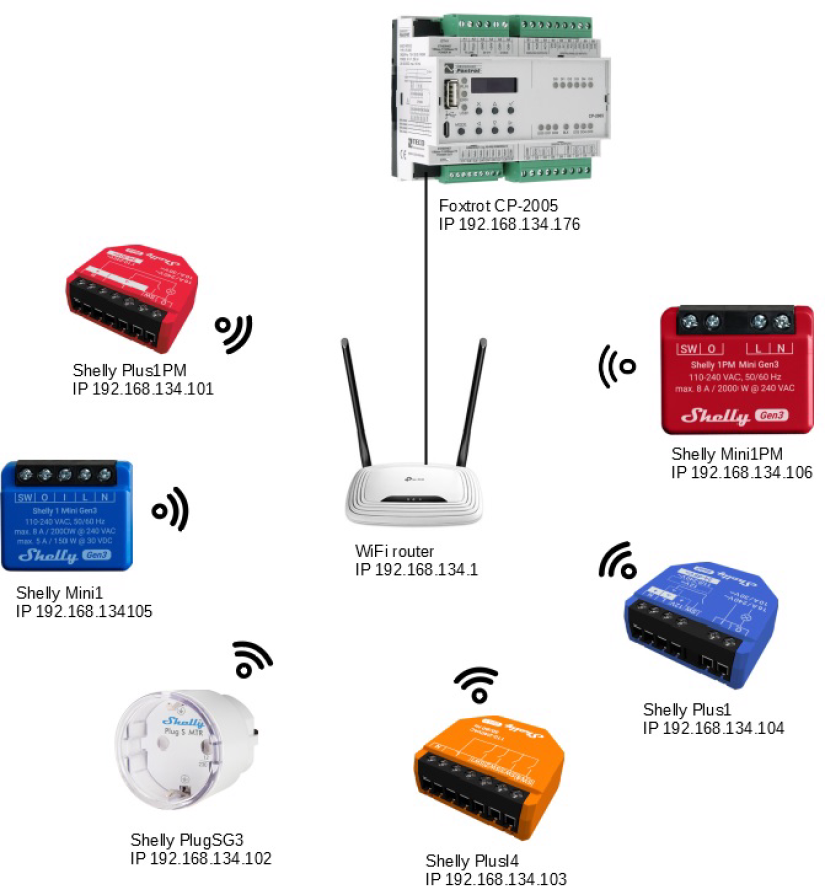
Fig. 1 Example of a Wi-Fi network with a Tecomat PLC and Shelly components
Introduction to Shelly
Shelly is a line of innovative devices that enable remote control of electrical circuits via a smartphone, tablet, PC, or home automation system. Shelly devices can operate independently on a local Wi-Fi network or through cloud-based home automation services.
After connecting directly to the device’s access point or to the device’s IP address on a local Wi-Fi network, the user can access the integrated web interface of the Shelly® device at the IP address http://192.168.33.1. The integrated web interface can be used to monitor and control the device, as well as to adjust its settings.
Shelly devices provide a local web interface for controlling and configuring the devices using a standard web browser on a computer or mobile device. Its functionality includes a range of features for setup and control, including the ability to turn devices on or off, set schedules, configure actions to be performed when certain conditions are met, configure the devices, and much more.
Note that you do not need an internet connection or Shelly Cloud to use the local web interface—the only requirement is that your browser must be on the same Wi-Fi network as your Shelly device.
For more information about the library, its use, and a connection example, see the TXV 005 69.01 manual for the ShellyLib library and the company website.